










[ad_1]

Prolonged squinting at a mobile phone or long hours of computer work can put extra stress on the neck muscles, leading to pain, stiffness and a condition commonly known as ‘Tech Neck’.
This problem is often caused by keeping the head tilted forward for long periods of time. When the head tilts forward while looking at the screen, the neck muscles have to work harder to support it.
Healthcare professionals, office workers and others whose work involves looking down frequently or spending long periods of time in front of a computer may be more prone to these symptoms.
Try the chin tuck exercise:
A simple exercise to help keep the head and neck in a relatively balanced position is chin tucks.
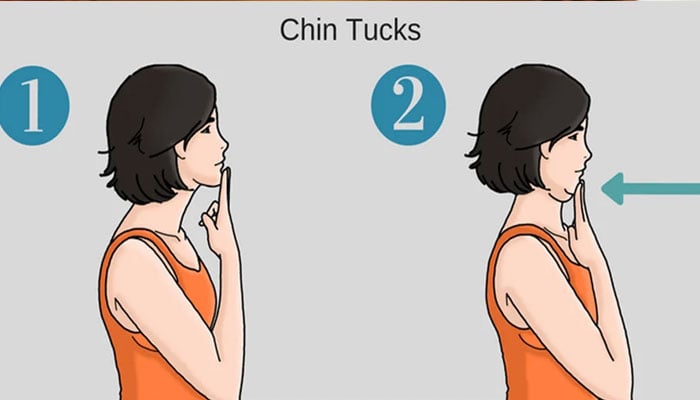
To do this exercise, sit straight in a chair, keep your back straight and look straight ahead.
Without raising or lowering the head, slowly pull the head and chin back, as if a slight fold is forming under the chin, hold this position for a few seconds, then release the neck and return to the normal position.
It is normal to feel a slight stretch or slight tension in the back of the neck, but this movement should not cause sharp or increasing pain.
The purpose of this exercise is to help maintain better head and neck alignment and activate the muscles that support the neck.
How to use the screen?
Exercise alone cannot reverse the effects of poor sitting and posture throughout the day, keeping the screen at a comfortable height for the eyes, sitting with proper back support and avoiding long periods of sitting in one position can help reduce neck strain.
It is also important to take regular breaks, looking away from the screen, changing positions and moving the neck and shoulders periodically can prevent muscles from being under constant tension for long periods of time.
Note: This article is published for the information of readers, follow your physician’s advice on health related matters.
[ad_2]